
How to Eliminate Static, Noise & Lag in Car Bluetooth Adapters: Complete AUX & FM Guide
Authored by the DriveGear Lab Mobile Audio & Signal Processing Division. A definitive troubleshooting guide on eliminating alternator whine, ground loop isolation, Bluetooth codec selection (aptX HD vs AAC vs SBC), FM transmitter frequency optimization, and smartphone gain calibration.
Few things ruin a favorite road trip playlist faster than a persistent background hiss, muffled audio dynamics, or an annoying high-pitched electrical whine that rises and falls with engine RPM. Adding Bluetooth streaming to an older vehicle via a 12V FM transmitter or 3.5mm AUX adapter is an affordable and popular upgrade. Yet millions of drivers suffer through terrible audio quality simply because of misconfigured frequency channels, ground loop voltage potentials, or severe digital compression artifacts that can be diagnosed and permanently cured in five minutes.
Lab-Benchmarked Bluetooth Adapters & Wireless Receivers
Explore Our Tested Bluetooth Transmitters & Audio Hardware
We tested signal-to-noise ratios, DAC clarity, fast QC 3.0/PD charging isolation, and microphone noise cancellation:
1. Ground Loop Isolators: Eliminating Alternator Whine
The classic “jet engine” whistle that increases in pitch as you step on the gas pedal is not a Bluetooth transmission glitch—it is an analog electrical phenomenon known as a Ground Loop.
When your Bluetooth adapter is powered by the vehicle’s 12V cigarette lighter socket while simultaneously connected to the stereo via a 3.5mm AUX cable, the audio signal and power supply share a common electrical ground. Because the cigarette socket ground and the head unit chassis ground are separated by feet of factory wire harness, they operate at slightly different electrical ground potentials.
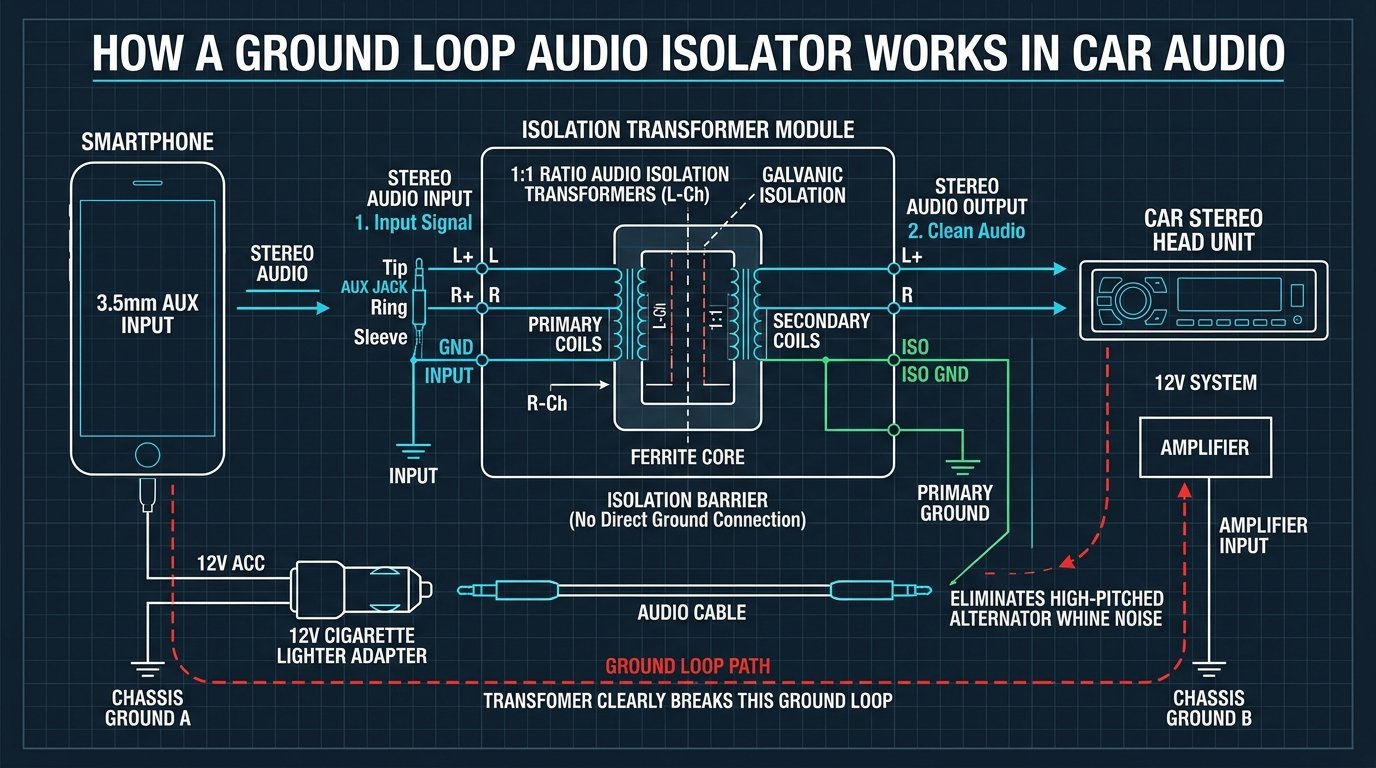
Figure 8.1: Technical schematic illustrating how a 1:1 audio isolation transformer breaks the ground loop path and prevents alternator AC ripple infiltration.
- How AC Ripple Enters Audio: The vehicle alternator generates alternating current (AC) that is rectified into direct current (DC) by internal diodes. However, small amounts of high-frequency AC ripple voltage escape the diodes. In a ground loop circuit, this ripple voltage travels along the outer shield of your AUX audio cable directly into the stereo pre-amp, producing loud whining noise!
- The 1:1 Isolation Transformer Solution: Installing a Ground Loop Audio Isolator (such as the Mpow or BESIGN compact 3.5mm isolator) between the adapter and the AUX jack instantly cures the issue. Inside the isolator, magnetic primary coils transfer audio energy to secondary coils via electromagnetic induction with zero direct electrical ground contact. The ground loop is severed, and alternator whine disappears completely!
2. Finding Completely Clear FM Radio Frequencies
If you use an FM transmitter that broadcasts audio over vehicle radio waves (87.5 MHz – 107.9 MHz), static occurs whenever your adapter’s low-power broadcast collides with a commercial radio station operating on the same or adjacent frequency.
The 3-Step Clear Frequency Discovery Routine:
- Check the Band Edges: Commercial broadcast radio stations rarely license frequencies at the absolute bottom or top of the FM spectrum. Set your radio to 87.7 MHz, 87.9 MHz, or 88.1 MHz. In 90% of suburban markets, these low channels are completely unoccupied.
- Use Radio-Locator Search Tools: When embarking on long cross-country road trips, use free online radio database tools (like Radio-Locator.com / Vacant Channels) to find vacant frequencies by city or ZIP code.
- Dismount or Retract the Factory Antenna: If you strictly listen to Bluetooth music and never listen to local broadcast radio, unscrew your vehicle’s roof whip antenna or disconnect the powered antenna mast. This reduces external radio station signal strength by 90%, leaving a pitch-black RF backdrop for your in-cabin transmitter!
3. The Gain Staging Hierarchy: The “85% Volume Rule”
A shocking percentage of audio distortion in car Bluetooth setups is caused by improper gain staging across three independent volume controls:
- Volume Control 1 (Smartphone Volume): Set your smartphone media volume slider to exactly 80% to 85%. Setting your phone to 100% maximum volume drives the phone’s internal digital headphone amplifier into digital clipping and harmonic distortion. Conversely, setting phone volume below 50% forces the downstream car stereo to amplify background floor hiss.
- Volume Control 2 (Bluetooth Adapter Hardware Knob): If your adapter features a physical rotary dial, set it to 80% to 90%.
- Volume Control 3 (Car Head Unit Master Volume): Use your car’s physical dashboard volume knob to control overall listening loudness. This multi-stage calibration ensures maximum signal-to-noise ratio (SNR) with zero preamp clipping!
4. Understanding Bluetooth Codecs: SBC vs. AAC vs. aptX HD vs. LDAC
Not all Bluetooth connections are created equal. The underlying digital compression codec dictates frequency response, audio fidelity, and latency:
- SBC (Subband Codec – 328 kbps): The universal legacy baseline supported by all Bluetooth hardware. Sounds flat, compresses high-frequency cymbals into crunchy digital artifacts, and introduces 150-250ms of audio latency (making video dialogue noticeably out of sync).
- AAC (Advanced Audio Coding – 250 kbps): The native transmission codec for Apple iPhones. Provides pristine audio transparency on iOS devices with sophisticated psychoacoustic modeling that sounds virtually indistinguishable from a wired connection.
- Qualcomm aptX & aptX HD (352 kbps – 576 kbps): Superior high-resolution transmission for modern Android smartphones. Preserves full 24-bit/48kHz audio resolution with near-zero latency (under 40ms with aptX Low Latency).
- Sony LDAC (990 kbps): The pinnacle of audiophile wireless streaming. Transmits three times more data than standard SBC, supporting true 24-bit/96kHz Hi-Res Audio.
5. Noisy 12V USB Chargers: Cheap DC-DC Switching Regulators
If you notice audio buzzing appears ONLY when you plug your phone into a USB charging cable while listening to music, the culprit is the cheap switching power supply inside the 12V cigarette adapter.
Bargain gas-station car chargers use cheap, unshielded buck-converter chips that pulse current at 100kHz to 500kHz without electromagnetic interference (EMI) filtering. This high-frequency switching radiation radiates directly into adjacent antenna lines and AUX cables. Upgrade to a certified, shielded USB-C Power Delivery (PD 3.0) charger featuring GaN (Gallium Nitride) technology and internal toroidal choke filtering (such as Anker or Baseus), which eliminates radiated electrical noise.
6. Smartphone Audio Enhancement Conflicts: Dolby Atmos & EQ Clashes
Modern mobile operating systems include aggressive digital audio post-processing algorithms (such as Apple Music Sound Check, Samsung Dolby Atmos, Spotify Normalize Volume, and dynamic bass virtualization).
When these smartphone audio processing algorithms interact with a car stereo’s built-in DAC and equalizer curves, severe audio degradation occurs:
- Turn Off Volume Normalization: Features like Spotify “Normalize Volume” apply dynamic range compression that crushes transients (kick drum punch and snare snap), reducing audio dynamics to a mushy, lifeless wall of sound. Disable normalization in your streaming app settings to restore full 16-bit uncompressed musical dynamics.
- Disable Virtual Surround / 3D Audio: Virtual surround algorithms intentionally manipulate audio phase relationships between left and right channels to simulate spatial room acoustics. When sent through an analog AUX or FM transmitter, these phase-shifted signals cancel each other out in the car stereo, completely erasing centered vocal clarity! Set phone audio effects to “Off” or “Direct Stereo”.
- Ferrite Core RFI/EMI Choke Beads: Clamping a snap-on ferrite core choke bead around both ends of your 3.5mm AUX cable and 12V DC power wire acts as a passive low-pass filter, attenuating radio frequency interference (RFI) from high-voltage spark plug wires and fuel injectors before noise can penetrate the preamplifier.
7. Physical 3.5mm AUX Cable Shielding & Contact Oxidation
If you use an auxiliary cable to connect your phone or Bluetooth DAC to the car stereo, the physical cable itself can act as a radio antenna picking up electromagnetic interference from the vehicle wiring harness.
- Double-Shielded Oxygen-Free Copper (OFC) Cables: Bargain dollar-store audio cables use ultra-thin 28-gauge copper wire wrapped in cheap ungrounded foil. Invest in a heavy-gauge 3.5mm audio cable featuring 99.99% OFC conductors, high-density braided copper shielding, and 24K gold-plated TRS connectors. Braided copper shielding shunts external RF interference directly to vehicle ground before it reaches the audio signal conductors.
- Cleaning Oxidized 3.5mm AUX Sockets: Over years of exposure to automotive humidity and cabin dust, female 3.5mm headphone jacks build up microscopic surface oxidation on internal spring leaf contacts. Spray electronic contact cleaner (e.g. DeoxIT D5) onto a cotton micro-swab and insert into the AUX port. Rotate gently to scrub away oxidation, restoring pristine contact pressure and eliminating static crackling whenever the wire is bumped.
8. Frequently Asked Questions (FAQ)
Q1: Does a ground loop isolator reduce bass response or volume?
Cheap, poorly wound isolation transformers can roll off sub-bass frequencies below 40Hz by 1 to 2dB. However, premium audiophile isolators utilize high-permeability permalloy or ferrite cores that maintain a completely flat frequency response from 20Hz to 20,000Hz with zero perceptible volume attenuation.
Q2: Why do callers complain about road noise during hands-free phone calls?
Most 12V FM transmitters locate their internal microphone down near the vehicle center console gear shifter—several feet away from the driver’s mouth and directly next to transmission tunnel vibration. Choose a Bluetooth adapter that features a separate lapel microphone with a 6-foot wire that clips directly to your sun visor or steering column for crystal-clear CVC 8.0 noise-cancelled speech.
Q3: Which provides better audio quality: a Bluetooth FM transmitter or a 3.5mm Bluetooth AUX adapter?
A direct 3.5mm Bluetooth AUX adapter is vastly superior. FM transmitters must compress audio into an analog radio wave subject to FCC Part 15 power limitations and atmospheric static. An AUX adapter passes uncompressed line-level analog signals directly into the car stereo’s amplifier, delivering dramatically punchier mid-bass, crisp treble, and dynamic range.
DriveGear Lab acoustic testing adheres to AES17 audio measurement standards and Bluetooth SIG SIG-QDL certification protocols.