Car Head-Up Display (HUD) Setup Guide: OBD2 vs GPS Data, Reflective Windshield Film, and Speed Limit Calibration
Head-Up Displays (HUD) project vital driving telemetry directly into the driver’s forward field of vision, drastically reducing cognitive reaction times. This comprehensive technical guide details optical projection physics, dual-mode OBD2 CAN-bus vs GPS satellite architectures, windshield double-pane ghosting elimination, optical reflection film application, and night auto-dimming calibration.
1. Human Factors & Cognitive Latency: The Science of Head-Up Displays
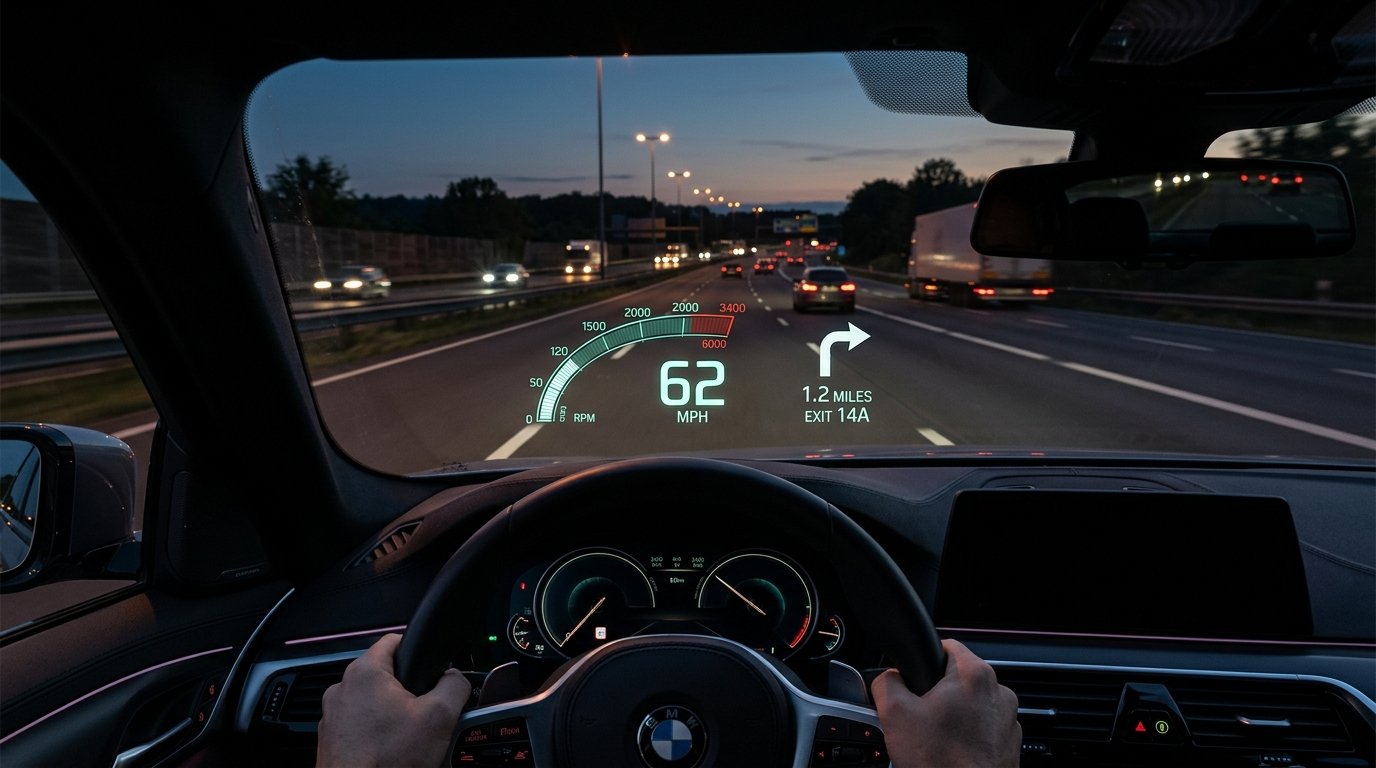
When driving at 70 MPH (103 feet per second) on an interstate highway, glancing down at an instrument cluster to check your vehicle speed or engine coolant temperature requires your eyes to look away from the road for an average of 1.2 to 1.5 seconds. In that brief window, your vehicle travels over 150 feet completely unmonitored.
Furthermore, the human optical system requires approximately 300 to 500 milliseconds of optical accommodation time to shift focal convergence from the distant horizon (optical infinity) to the near dashboard gauge needles 24 inches away, and then refocus back onto traffic. Head-Up Displays (HUD) project virtual telemetry images onto the windshield glass focused at a virtual distance 6 to 8 feet ahead over the vehicle hood. This keeps essential telemetry directly within the driver’s primary line of sight, reducing driver cognitive reaction times by up to 40% during highway emergency braking maneuvers.
2. Architecture: OBD2 CAN-Bus Mode vs. Multi-GNSS Satellite Mode
Aftermarket automotive HUD systems operate via two distinctly different data transmission architectures, with modern premium units featuring hybrid dual-system microchips:
- OBD2 Diagnostic Link Mode (Zero-Lag ECU Data): Plugs directly into the vehicle’s standard 16-pin Diagnostic Link Connector (DLC) under the steering wheel. The HUD communicates over the high-speed Controller Area Network (CAN-Bus, ISO 15765-4) or K-Line protocols. It queries the Engine Control Unit (ECU) directly, displaying real-time digital road speed, engine RPM tachometer arcs, coolant water temperature, intake manifold boost pressure, throttle percentage, and instant battery alternator voltage. Because data is read directly from wheel speed sensors and engine crankshaft position sensors, there is absolute zero latency. OBD2 mode is compatible with nearly all gasoline vehicles manufactured for the US market after January 1, 1996.
- Multi-GNSS Satellite Mode (Universal Global Speed): Relies on internal satellite receiver hardware (GPS, GLONASS, and Galileo) powered by a standard 5V USB or 12V auxiliary port. The unit calculates ground speed via Doppler satellite frequency shift and coordinates triangulation. GPS mode is universally compatible with every vehicle on earth—including older classic cars, diesel commercial trucks, electric vehicles (EVs), boats, and motorcycles. However, GPS speed takes 1 to 2 seconds to acquire satellite locks upon initial cold boot and experiences temporary signal dropouts when traveling through subterranean tunnels or underground parking garages.

Figure 4: Comprehensive technical architectural comparison between direct OBD2 CAN-Bus engine telemetry and Multi-GNSS satellite speed calculations.
3. Eliminating the “Double Image” (Ghosting) on Laminated Windshields
The most pervasive optical complaint with aftermarket windshield HUDs is double imaging or “ghosting”:
- The Physics of Double Reflection: Modern automotive windshields are constructed from safety laminated glass consisting of two separate layers of glass bonded together with a clear polyvinyl butyral (PVB) plastic interlayer. When the HUD’s high-intensity LED projector beams upward, light reflects off the inner glass surface, while a secondary reflection bounces off the outer glass surface approximately 4mm away. This produces two distinct overlapping speed numbers—a sharp primary image and a faint, offset “ghost” image directly above it.
- Dedicated Optical Reflection Film Application: High-quality HUD kits include a rectangular semi-reflective, semi-transparent optical polarization film. Applying this thin PET film to the inside of the windshield directly over the projection zone equalizes the refractive index, reflecting 95% of the primary light rays while cancelling the secondary outer refraction. The result is a razor-sharp, high-contrast digital display with zero ghosting.
- Applying Reflection Film Without Bubbles: Thoroughly clean the windshield interior with streak-free glass cleaner. Spray a light mist of water mixed with a single drop of liquid dish soap onto the glass. Peel the backing off the optical film, position it in the driver’s forward sightline, and use a flat rubber squeegee to work all water and air bubbles outward from the center. Allow to dry completely for 24 hours.
- Integrated Combiner Screens: As an alternative to windshield projection, high-end “Combiner HUDs” feature a built-in motorized or manual tinted acrylic reflector lens that flips up directly from the top of the HUD housing. Because the light reflects off a single, rigid 2mm acrylic pane, ghosting is physically impossible, requiring zero windshield film.
4. Optical Glare, Ambient Photodiodes & Auto-Dimming Calibration
A Head-Up Display must remain effortlessly visible in blinding noon daylight without blinding the driver at night:
- High-Luminance Micro-LEDs: To overcome direct sunlight glare reflecting off vehicle hood paint, automotive HUD projection arrays utilize ultra-high-luminance surface-mount diodes (SMDs) outputting over 5,000 cd/m² (nits) of peak brightness.
- Integrated Silicon Photodiode Light Sensors: High-end HUDs incorporate a forward-facing ambient light sensor (photodiode) that monitors ambient cabin brightness in real-time. Entering a dark tunnel or driving under nighttime streetlights smoothly ramps LED display brightness down to a gentle 50 nits in under 200 milliseconds, eliminating glare that causes driver night blindness.
- Speed Discrepancy Calibration: Vehicle factory speedometers read slightly higher than true speed by design (regulated by European ECE-R39 and SAE standards, typically 2% to 4% above actual velocity). If your HUD speed does not match your instrument cluster needle, access the HUD firmware menu (holding the rotary selection button) to adjust the Speed Parameter Scale from 100 up to 103 or 105 until both displays sync in perfect unison.
5. Power Management, Auto Sleep & Low-Voltage Cutoff
Preventing parasitic battery drain when your vehicle is parked overnight:
- OBD2 Communication Sleep Thresholds: When plugged into the OBD2 port, the HUD monitors engine RPM and vehicle CAN-Bus heartbeat messages. When the engine shuts off (RPM drops to 0) and CAN-Bus traffic ceases, the HUD enters an ultra-low-power standby sleep state drawing less than 3mA of current.
- Hybrid/EV Voltage Calibration: On hybrid vehicles (such as Toyota Prius) equipped with automatic start-stop engines, the internal combustion engine frequently shuts off at traffic lights while driving. If the HUD powers off prematurely at stoplights, adjust the HUD sleep trigger setting from “RPM 0” to “DC Voltage threshold” (e.g., entering sleep only when vehicle voltage drops below 12.8V for more than 3 minutes after the hybrid system completely powers down).
6. Cable Concealment & Airbag Deployment Zone Clearance
Routing the power cable from the dashboard HUD down to the vehicle’s OBD2 connector or 12V fuse box requires strict adherence to automotive interior safety standards:
- Avoiding Steering Column & Knee Airbags: Many modern vehicles feature an explosive knee airbag module mounted directly behind the plastic lower dash panel surrounding the OBD2 port. Never route loose or zip-tied cables across the path of the knee airbag deployment door! Secure the flat OBD2 ribbon cable tightly against existing factory metal brackets using zip ties with rubber chafe protectors.
- A-Pillar Curtain Airbag Clearance: If routing cables along the driver-side A-pillar, gently unclip the plastic pillar cover to inspect internal components. Modern vehicles house heavy side curtain airbags rolled tightly inside the A-pillar cavity. Always route the HUD wire behind the white nylon airbag cylinder, zip-tying it directly to the vehicle chassis sheet metal so an explosive curtain airbag deployment cannot propel the cable into the cabin.
7. Thermal Dissipation & Optical Mirror UV Protection
Operating directly on the top surface of the dashboard exposes the HUD projector to intense solar radiation and extreme thermal cycles:
- Solar Thermal Lens Distortion: In Combiner HUD systems featuring an acrylic curved mirror lens, intense magnifying-glass sunlight can focus onto internal plastic surfaces, causing optical warpage. Always choose HUD units manufactured with automotive-grade high-temperature polycarbonate (PC) and ABS blend plastics rated up to 185°F (85°C).
- Non-Slip Silicone Mounting Pads: Avoid cheap double-sided foam tape that melts into a gooey tar residue under summer heat. Use an automotive-grade washable silicone polymer anti-slip mat. The mat grips the textured dashboard vinyl purely through microscopic vacuum suction, holding the HUD firmly in place during hard cornering without leaving oily plasticizer stains on your dashboard.
8. Frequently Asked Questions (FAQ)
Can I use a Head-Up Display if I wear polarized sunglasses?
Standard windshield-projected HUDs reflect light off horizontal glass planes, polarizing the reflected light wave horizontally. Vertically polarized sunglasses are specifically engineered to block horizontally polarized reflections (such as road glare). As a result, wearing polarized sunglasses can make standard windshield HUD projections look 50% to 80% dimmer. For drivers who frequently wear polarized sunglasses, we strongly recommend choosing a Combiner HUD with an integrated vertical acrylic projection lens.
Is it legal to mount a HUD display on the dashboard in the United States?
Yes. In all 50 states, placing a compact HUD unit on top of the dashboard is fully street legal provided it is positioned in the lower corner or directly above the steering cowl where it does not obstruct the driver’s primary line of sight through the windshield wiper sweep zone. Because HUDs project transparent virtual numbers without physical opaque obstructions, they comply with state motor vehicle windshield visibility statutes.
Top 5 Best Car Head-Up Displays (HUD) Tested & Ranked
Compare lab bench test results across leading dual OBD2 and GPS HUDs, evaluating daylight optical nit output, CAN-bus refresh latency, tachometer accuracy, and windshield ghosting resistance.
DriveGear Lab optical testing adheres to SAE J2400 human factors in-vehicle display guidelines and ISO 15008 ergonomics of visual transport information systems.